| • | | Messages (APK files) related to traffic challans, electricity bill / connection issues |
| |
| • | | Communication about too-good-to-be-true investment offers |
| |
| • | | Alerts about reward points, address change, KYC update / expiry and account deactivation |
| |
| • | | Impersonation as government officials or relatives and other threats |
| |
Please do not click on any link received from unknown sources or withfully understanding its purpose. Fraudsters often send such links to take control of your device and steal your confidential banking information.
If you notice anything suspicious, report the same on the Sanchar Saathi website sancharsaathi.gov.in or on the Sanchar Saathi app.
Why Sanchar Saathi is Important
Sanchar Saathi enables you to: |
| |
| • | | Report suspected fraudulent calls, SMSes, WhatsApp messages and unwanted advertisement calls. |
| |
| • | | Block your lost / stolen mobile phone to prevent any misuse and trace it with real-time updates |
| |
| • | | Check how many SIM cards are issued in your name and report the ones that have not been taken by you or are no longer required |
| |
| • | | Verify the genuineness of mobile phones before purchase. |
| |
| • | | Report spoofed international calls showing Indian caller IDs. |
| |
| • | | Know your local Internet Service Providers (ISPs) by searching using PIN Code. |
| |
| How to Use Sanchar Saathi: |
| |
| • | | Download the Sanchar Saathi mobile app from the Google Play Store / App Store or visit the Sanchar Saathi website sancharsaathi.gov.in |
| |
| • | | Register with your mobile number and allow required permissions |
| |
| • | | Report a fraud by uploading a screenshot of the suspicious communication and submitting necessary details. |
| |
| Protect Yourself from Cyber Frauds: |
| |
| • | | Verify official contact details: Contact your bank or insurance company only through their official website, app or Customer Care number. |
| |
| • | | Never disclose OTPs, PINs or any confidential information: Banks and other financial institutions will never ask for your username, password, OTPs or PINs over calls or messages. Never disclose personal details like Credit Card Number or UPI PIN to anyone. |
| |
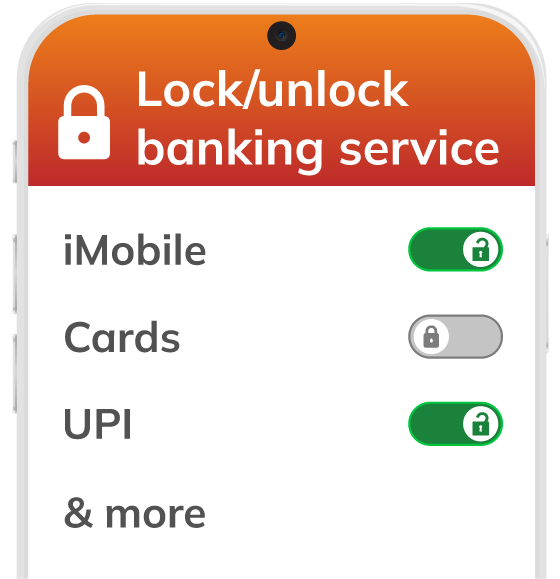
| • | | Enable SmartLock: Lock your Cards, iMobile, Net Banking and UPI transactions using ICICI Bank SmartLock on iMobile and Net Banking. Unlock them only when you need to use them. |
| |
| • | | Ignore unsolicited messages / calls: Do not pay attention to any unsolicited call / message / e-mail that promises large sums of money as insurance claim payments or refunds. |
| |
| • | | Never click on suspicious links in e-mails or messages. |
| |
| • | | Avoid downloading / installing unknown applications. |
| |
| If you notice anything suspicious: |
| |
| • | | For cyber fraud complaints, visit the National Cyber Crime Reporting portal cybercrime.gov.in or call 1930. |
| |
| • | | Alternatively, you may call the ICICI Bank Helpline on 18002662 |




No comments:
Post a Comment